
















.png)












































.png)


Apple device owners are used to paying for quality software. A subscription for a convenient calendar, a one-time purchase for an advanced clipboard manager, ten dollars for a system cleanup utility. The macOS software market has historically been considered premium and expensive.
However, among hundreds of commercial products, real gems are hidden — utilities whose developers could easily charge money but choose not to charge't. No hidden payments, subscriptions, or ad banners. Below are ten non-obvious programs that solve everyday problems more elegantly than paid alternatives. Such a starter set is worth installing on every MacBook right after unboxing.
AppCleaner: Proper Software Removal
Basic scenario: you downloaded a new program, tested the interface, were disappointed, and dragged the icon to the trash by habit. At first glance, the software is completely removed. In reality, the system kept dozens of megabytes of technical junk in the form of cached files, crash reports, and hidden settings folders. Over time, such remnants clog SSD space and inevitably affect computer speed.
AppCleaner solves the problem radically. The tool performs exactly one function, but does it flawlessly. Instead of simply dragging an icon to the trash, you drop it into the app's window. The program scans the drive in a second, finds all related hidden system files, and displays them in a list. One click of the delete button — and the software disappears without a trace. Commercial all-in-ones like CleanMyMac charge good money for similar functionality, while AppCleaner provides its best tool absolutely free.
Rectangle: Window Management
Standard window management in macOS is openly weak. The user has to carefully aim the cursor at a tiny green button, select the needed half of the screen through a dropdown menu, or painfully adjust the frame size manually.
Rectangle manager brings common sense back to workspace organization. Press Control + Option + Left Arrow — the active window instantly takes the left half of the monitor. Drag a window to the top edge of the display — it expands to full screen. Drag to the bottom-right corner — the frame neatly takes a quarter of the space. The program offers dozens of intuitive shortcuts for perfect tiling. You stop wasting time on jeweler's-precision mouse aiming and start working normally. The market offers paid alternatives like Magnet, but Rectangle fully covers the needs without financial investment.
AltTab: Adequate Task Switching
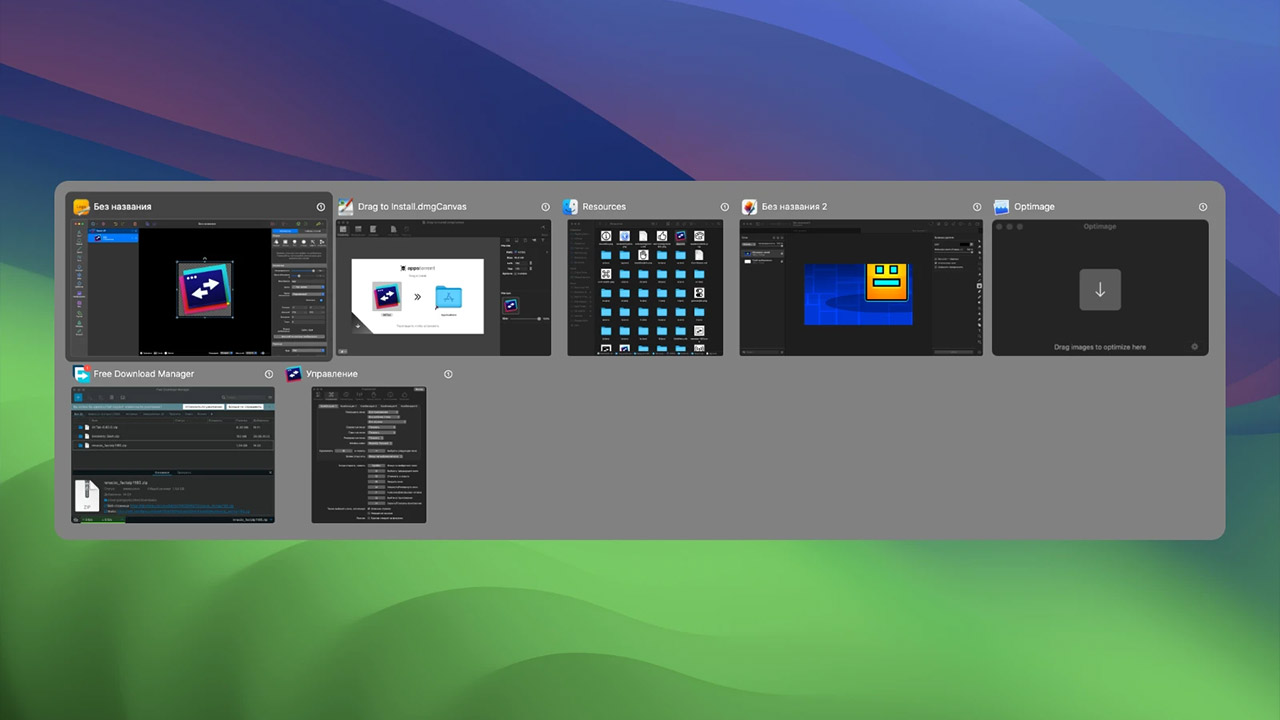
Switching from Windows to Mac always comes with physical pain from using the Command + Tab combo. The OS's built-in tool switches focus exclusively between running programs, not between individual windows. If three different documents are open in the browser, getting to the right one requires additional clicks or trackpad gestures.
AltTab elegantly brings back the familiar Microsoft product logic. Pressing Option + Tab brings up a translucent panel with previews of all open windows, not just static app icons. Basic navigation speed changes radically: you instantly jump from a needed draft to a specific messenger conversation. The utility allows flexible customization of thumbnail appearance, font size, and any convenient keyboard shortcuts.
The Unarchiver: Archive Extraction Without Problems
The standard system archiver periodically fails at rare file formats. If a contractor sent a heavy work project in RAR or 7z format, the built-in utility simply shows an error window. Searching for questionable online converters and uploading confidential corporate documents there is a bad and unsafe idea.
The Unarchiver works on the "install and forget" principle. The app has virtually no interface to distract from work. You set checkboxes in the initial settings once, assigning the utility as the default archiver. After that, double-clicking any archive format quietly and quickly extracts the contents to the same folder.
Raycast: Search on Steroids
The built-in system search Spotlight handles launching programs and local text file search well. If you want total system control without using the mouse, install Raycast.
Visually, the tool looks like a simple minimalist search bar, but under the hood lies enormous potential. The utility seamlessly integrates with external cloud services thanks to hundreds of free plugins written by a large developer community. Right from the search bar, you can translate text, close task cards in Jira, switch music in Spotify, or find documents in Google Drive without opening a heavy browser. Additionally, a powerful clipboard manager with multi-day history and an advanced physical unit converter are built in.
ImageOptim: Radical Image Compression
The utility is vital for designers, bloggers, layout artists, and all users who frequently send photos via email. Modern photos weigh unjustifiably much due to an abundance of hidden metadata: color profiles, camera model info, geolocation tags, and other technical junk.
ImageOptim compresses graphics files ingeniously and simply. You drag a batch of JPEG, PNG, or GIF photos into the running program's window. Complex algorithms mercilessly strip unnecessary digital information without the slightest visual quality loss. The final file size shrinks by 50–80%. Web pages with such optimized images load instantly, and sending a heavy email to a client takes seconds.
Itsycal: Calendar Always at Hand
Opening the massive Calendar system app for a minute-long date check is frankly inconvenient. Itsycal elegantly solves this small problem, compactly settling right in the top system menu bar.
Clicking the current date opens a minimalist and beautiful calendar for the current month. The program is deeply synced with system data: dots representing scheduled meetings appear neatly under dates. Hovering the cursor instantly shows a detailed list of specific events. New important events are easily added right from this little window without launching a separate interface.

VLC Media Player: Omnivorous Player
The legendary video player has been on the market for decades but remains an absolutely indispensable tool. The built-in QuickTime player looks beautiful but instantly capitulates before old video formats, rare codecs, and broken file fragments.
VLC's motto sounds extremely simple: if this program can't play it, what you have isn't a video file at all. The software reads absolutely any extension without installing additional codec packs, picks up streaming broadcasts from the network, can programmatically boost a quiet movie audio track during viewing, and correctly works with dozens of subtitle formats.
Ice: Menu Bar Organization
The more useful micro-utilities you install on the computer, the more the top system menu bar gets cluttered. Cloud storage icons, language layout switches, persistent VPN indicators, and weather widgets create continuous visual noise that distracts from work.
Ice lets you elegantly hide unnecessary elements. Hold the Command key and drag rarely-used icons past a special invisible separator. The icons completely disappear from view. To temporarily access them, simply click the separator itself. Only the clock, battery level, and Wi-Fi switch remain visible. The menu bar finally looks clean, strict, and neat.
Portal: Focus Setup
The last app on the list isn't aimed at technical system optimization, but at fine emotional tuning of the user. In conditions of constant urban information noise, it can be critically difficult to focus on a complex analytical task.
Portal replaces the familiar static desktop wallpaper with looped video of atmospheric natural landscapes: a foggy coniferous forest, a heavy tropical downpour, or a cold mountain sunset. The key technical feature lies in the sound design. Using spatial audio technology, the app creates an incredibly realistic acoustic picture. Deep rain sound or voluminous rustling of trees fully envelops and reliably isolates from annoying surrounding office noise. It sounds extremely simple, but in practice the tool wonderfully helps enter a state of long, deep work concentration.
0 comments